In today’s digital-first world, showing up on Google is no longer optional—it’s essential. When potential customers search for products or services, they rarely go beyond the first page of results. If your business isn’t visible there, you’re missing out on valuable traffic, leads, and revenue.
The good news? You don’t need to spend money on ads to rank higher. With the right strategies, you can learn how to get your business to the top of Google search for free and attract consistent organic traffic.
This comprehensive guide is designed for small business owners, entrepreneurs, and beginners who want practical, step-by-step methods to improve their online visibility—without paying for ads.
How Google Ranking Works (Simple Explanation)?
Before diving into strategies, it’s important to understand how Google decides which businesses appear at the top.
Google’s ranking system is based on three primary factors:
- Relevance: How well your business matches what users are searching for
- Distance: How close your business is to the searcher’s location
- Prominence: How well-known and trusted your business is online
There are two main types of results:
- Organic Results (free listings based on SEO)
- Paid Ads (sponsored listings at the top)
To rank higher organically, you must optimize your online presence using Search Engine Optimization (SEO) techniques.
How to Add My Business to Google for Free (Step-by-Step Guide)?
One of the most powerful and completely free tools is Google Business Profile (GBP).
Step-by-Step Process:
- Create or sign in to your Google account
- Go to Google Business Profile and click “Add your business”
- Enter your business name and category
- Add your location or service area
- Provide contact details (phone number and website)
- Verify your business (via mail, phone, or email)
Optimization Tips:
- Write a clear, keyword-rich business description
- Upload high-quality images of your business
- Add accurate business hours and services
- Keep all information updated
By completing this process, you’ve successfully learned how to add your business to Google for free, which is the foundation of local SEO.
Optimize Your Google Business Profile to Rank #1
Creating your profile is just the beginning. Optimization is what drives rankings.
Key Optimization Strategies:
- Use relevant keywords naturally in your business description
- Ensure NAP consistency (Name, Address, Phone Number) across all platforms
- Add detailed services and product listings
- Post regular updates, offers, and announcements
- Utilize the Q&A section to answer common customer queries
Consistency and activity signal to Google that your business is active and trustworthy.
Get More Reviews to Boost Rankings
Customer reviews play a crucial role in improving your visibility.
Why Reviews Matter:
- They build trust with potential customers
- They influence Google’s ranking algorithm
- They improve click-through rates
Best Practices:
- Politely ask satisfied customers for reviews
- Share your review link via email or SMS
- Respond to all reviews—both positive and negative
Encourage customers to mention your services naturally, as this can help with keyword relevance.
Build a Free Website (Optional but Powerful)
While not mandatory, having a website significantly enhances your chances of ranking higher.
Free Platforms You Can Use:
- WordPress.com
- Wix
- Google Sites
Optimization Tips
- Use your main keyword on the homepage
- Create location-based pages (e.g., “Plumber in Dhaka”)
- Ensure your site is mobile-friendly and fast-loading
A website strengthens your online authority and supports your Google Business Profile.
Read also: Why is your site is not ranking on Google?
How to use external linking on your website?
Free SEO Strategies to Rank Higher on Google
To truly understand how to get your business on top of Google search for free without ads, you need to implement core SEO strategies.
Essential Techniques:
1. Keyword Research
Use free tools to find what your customers are searching for.
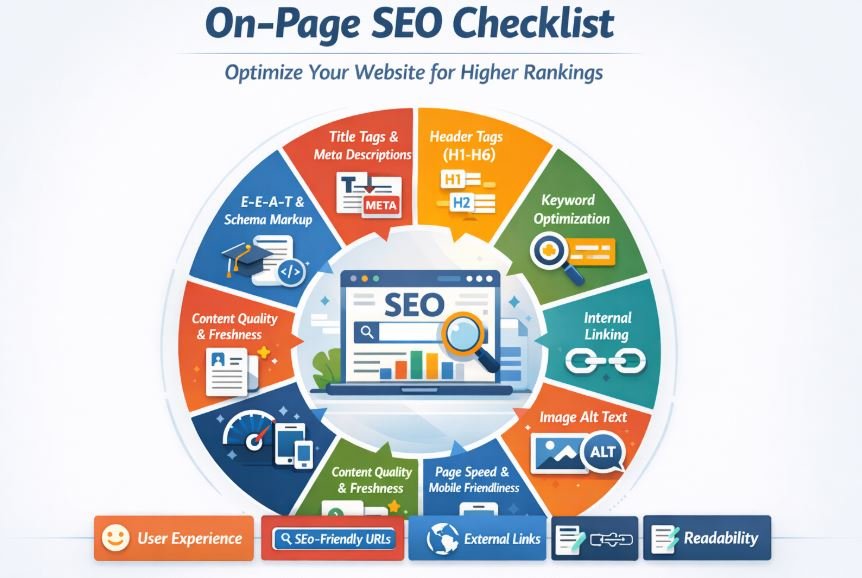
2. On-Page SEO
- Optimize title tags and meta descriptions
- Use headings (H1, H2, H3) properly
- Include keywords naturally in your content
3. Internal Linking
Link related pages to improve navigation and SEO.
4. Image Optimization
- Use descriptive file names
- Add alt text with keywords
These strategies help search engines understand and rank your content effectively.
Local SEO Tricks to Dominate Nearby Searches
Local SEO is essential for businesses targeting nearby customers.
Effective Local SEO Tips:
- List your business in online directories
- Build citations on trusted platforms
- Use “near me” and location-based keywords
- Embed Google Maps on your website
These techniques improve your chances of appearing in local search results and Google Maps.
Use Social Media to Boost Google Ranking
While social media doesn’t directly affect rankings, it plays a significant supporting role.
How It Helps:
- Drives traffic to your website
- Increases brand awareness
- Encourages content sharing
Best Practices:
- Post consistently
- Share valuable and engaging content
- Link back to your website or business profile
Track Your Performance (Free Tools)
Monitoring your progress is essential for continuous improvement.
Recommended Free Tools:
- Google Search Console
- Google Analytics
- Google Business Profile Insights
Key Metrics to Track:
- Website traffic
- Keyword rankings
- Customer actions (calls, clicks, directions)
Common Mistakes to Avoid
Avoid these errors to maintain steady growth:
- Keyword stuffing (overusing keywords unnaturally)
- Inconsistent business information
- Ignoring customer reviews
- Neglecting updates and maintenance
Consistency and authenticity are key to long-term success.
Pro Tips to Rank Faster Without Spending Money
- Post regularly on your Google Business Profile
- Add FAQ sections with relevant keywords
- Upload high-quality, engaging images
- Build backlinks from local websites and blogs
These advanced strategies can accelerate your ranking progress.
FAQs
How long does it take to rank on Google for free?
Typically, it takes a few weeks to several months, depending on competition and consistency.
Can I rank without a website?
Yes, using Google Business Profile alone can still help you rank locally.
Is Google Business Profile enough?
It’s powerful, but combining it with a website and SEO strategies yields better results.
How to get my business on top of Google search for free fast?
Focus on optimizing your profile, gathering reviews, and maintaining consistent activity.
Conclusion
Ranking your business on Google doesn’t require a big budget—just the right approach and consistent effort. By optimizing your Google Business Profile, applying SEO techniques, and engaging with your audience, you can significantly improve your visibility.
Start today by implementing these strategies, and you’ll be well on your way to getting your business on top of Google search for free.